Team Performance Tracking
Track Team Performance and Individual Sales Activity
See how the floor is doing and how each person is doing. Avinix CRM helps managers review leads, follow-ups, pipeline, and wins so coaching is based on activity — not on memory or a weekly spreadsheet.
- Team view of leads, follow-ups, and pipeline
- Individual tracking of each rep’s activity and wins
- Spot who needs help and who is closing
- Use weekly activity for coaching in the moment
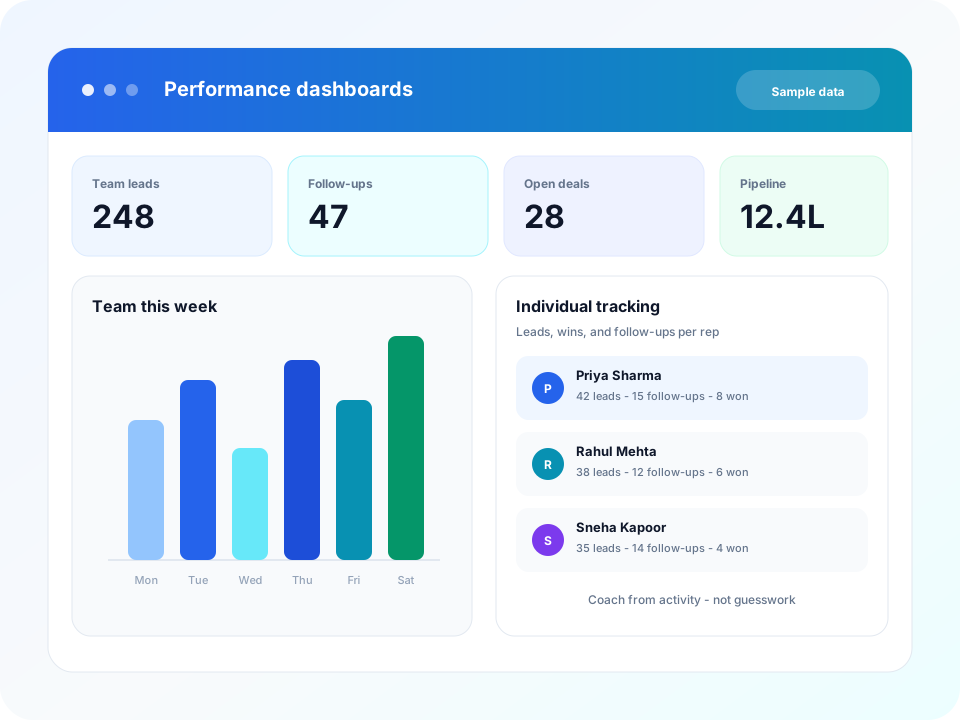
Coaching Should Not Wait for a Spreadsheet
If the only performance review is a month-end export, the follow-up that slipped last Tuesday is already gone. Team performance tracking keeps the floor and each person visible while the week is still in play.
- Managers find out who is behind only at month-end
- Activity lives in chats and memory, so coaching is guesswork
- Team totals hide the one person who stopped following up
- Wins are celebrated, but nobody can see the work that produced them
Avinix CRM pulls team and individual activity from the same work the reps already log on leads. Numbers in website graphics are sample demo data.
How Team Performance Tracking Works
You do not build a second reporting process. You review the activity that already sits on leads, follow-ups, and the pipeline.
Step 1
Work stays on the lead
Calls, follow-ups, pipeline moves, and wins are recorded as the team sells.
Step 2
Review the floor
See team leads, follow-ups, and pipeline so you know how the week is going.
Step 3
Open the individual view
Check each rep’s activity and wins when someone needs help or is closing well.
Step 4
Coach from what happened
Use weekly activity in the moment, instead of waiting for a spreadsheet export.
What Managers Can Review
Team leads and pipeline
See how much is coming in and where opportunities sit, without opening every inbox.
Follow-up activity
Check whether the floor is calling and closing loops, or letting reminders age.
Individual tracking
Open one person to see their activity and wins when coaching needs to be specific.
Who needs help
Spot a rep who is quiet this week before the month is already lost.
Who is closing
See wins next to the work that produced them, so good habits can be repeated.
Weekly coaching
Use activity in the moment, instead of waiting for a reconstructed report.
Who This Is For
- Sales managers running weekly team performance reviews
- Owners who want to see which people are following up and which are stalling
- Team leads coaching from activity instead of end-of-month reports
- Businesses replacing spreadsheet trackers for calls, leads, and wins
Related Features
Sales Pipeline
Move opportunities through customizable Kanban stages on the same record as calls, WhatsApp, and the next action.
Team Management
Give the floor owners, roles, and visible work — then review activity without reconstructing a weekly report.
Performance Dashboard
Review leads, pipeline, and team activity in one dashboard — then filter the slice that matters.
Advanced Filters
Filter every report and parameter so managers can track the slice of leads, pipeline, and activity that matters.
Frequently Asked Questions
Yes. Avinix CRM includes team performance tracking so managers can review leads, follow-ups, pipeline, and wins for the floor and for each person.
Ready to Coach From Real Activity?
See team and individual performance tracking in Avinix CRM — leads, follow-ups, pipeline, and wins in one view.